
Famekite / cheat sheet
Social video sizes and safe zones, on one page.
The right size is only half of it. On vertical video, the app covers parts of your frame with buttons, captions and usernames. Here are the sizes, plus a free overlay to drop into your editing timeline so nothing important gets hidden.
Free access
Unlock this free tool
Enter your email and we’ll send a 6-digit code. One unlock opens every Famekite guide and tool.
- Free forever
- No newsletter
- Takes 30 seconds
Unlocked ✓
We store your name, company and email privately to give you access. No marketing emails unless you ask. Privacy details.
Video sizes by placement
| Placement | Aspect ratio | Recommended size (px) | Watch out for |
|---|---|---|---|
| TikTok | 9:16 vertical | 1080 × 1920 | Keep text away from the bottom caption/username area and the right-side buttons. |
| Instagram Reels | 9:16 vertical | 1080 × 1920 | The grid cover crops toward the centre; keep the title in the middle of the frame. |
| YouTube Shorts | 9:16 vertical | 1080 × 1920 | Title, channel name and subscribe button sit at the bottom; buttons on the right. |
| Instagram / Facebook feed | 4:5 portrait (or 1:1) | 1080 × 1350 | 4:5 takes more screen space in the feed than square. |
| Stories (Instagram / Facebook) | 9:16 vertical | 1080 × 1920 | Top (profile) and bottom (reply bar / link sticker) are covered. |
| YouTube (standard video) | 16:9 horizontal | 1920 × 1080 (or 3840 × 2160) | End screens use the last seconds; leave room if you plan to add them. |
| YouTube thumbnail | 16:9 | 1280 × 720 | The timestamp covers the bottom-right corner. Check it at small size. |
| LinkedIn video | 1:1, 4:5, 16:9 or 9:16 | 1080 × 1080 / 1080 × 1350 | Most viewing is in the feed on mobile; captions matter. |
| X (Twitter) video | 16:9 or 1:1 | 1280 × 720 / 1080 × 1080 | Autoplays muted in the timeline. |
Apps change their interfaces often. Treat these as reliable starting points and always preview the final export on a real phone before publishing or launching ads.
Free 9:16 safe-zone overlay
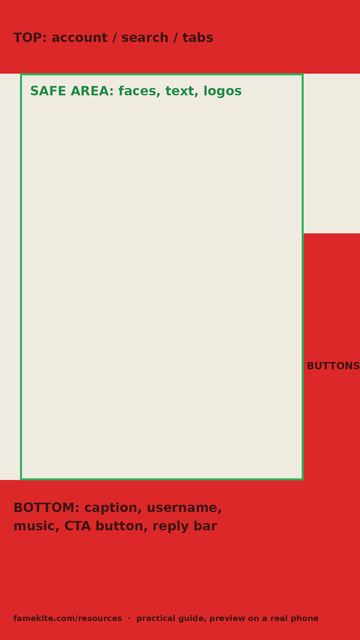
Simple rules that prevent most problems
- Shoot vertical when the main use is TikTok, Reels or Shorts. Cropping horizontal footage loses a lot of the frame.
- Keep captions in the middle band of the frame, not at the very bottom.
- Put the key message in the centre so it survives the Reels grid crop and feed crops.
- Export one master at 1080 × 1920, then make 4:5 and 16:9 versions deliberately instead of letting the app crop.
- Check the cover/first frame as a still image.
Need versions made for every placement? See short-form video editing.
Before you brief us
What size is a TikTok, Reel or Short?
All three use 9:16 vertical video; 1080 × 1920 pixels is the standard working size.
Is the safe-zone overlay exact?
It is a practical guide, not an official template. Interfaces differ by device and app version, so always preview on a real phone.
Can I use one video everywhere?
Often, with adjustments. One 9:16 master can cover TikTok, Reels and Shorts; feed and YouTube placements usually need their own crop.
Free download
Want the worksheets too?
Six editable planning tools (brief, script, editor handoff, test planner, launch map, publishing checklist) in one free ZIP.
A clear next step
Bring the goal. We’ll discuss the scope.
Share your audience, existing assets and the job you need the creative to do. Deliverables, timing, revisions and any media budget are agreed before work starts.